title: Group Krajewski Hoa others summary: Group assignment for Networking and Communications week show_authors: true authors: - name: Miglio Krajewski email: Miglio.Krajweski@student.oulu.fi - name: Lý Thái Hoà email: Hoa.Ly@student.oulu.fi - name: Hadi Rezaeikarjani email: Hadi.Rezaeikarjani@student.oulu.fi
Overview
This week's group project was to set up a communication network using the ESP-NOW protocol. The website, randomnerdtutorials offered guidance and example codes for this task.
Setting up the Network
Only a sender-receiver system was set up during class. In order to set up such a system, one ESP-32 is flashed with a sender-sketch, whilst the other is flashed with a receiver sketch. Prior to flashing, the mac-address of the receiving ESP-32 needs to be recorded, so that the sender can broadcast specifically to the receiver.
Step 1: Recording the MAC-Address
The MAC-Address was found by flashing the receiver ESP-32 with an example code from randomnerdtutorials that displays the MAC-address in the console:
´´´
/
Rui Santos & Sara Santos - Random Nerd Tutorials
Complete project details at https://RandomNerdTutorials.com/get-change-esp32-esp8266-mac-address-arduino/
Permission is hereby granted, free of charge, to any person obtaining a copy of this software and associated documentation files.
The above copyright notice and this permission notice shall be included in all copies or substantial portions of the Software.
/
include
include
void readMacAddress(){ uint8_t baseMac[6]; esp_err_t ret = esp_wifi_get_mac(WIFI_IF_STA, baseMac); //method called from library which reads MAC if (ret == ESP_OK) { Serial.printf("%02x:%02x:%02x:%02x:%02x:%02x\n", //MAC is printed to console when function is called baseMac[0], baseMac[1], baseMac[2], baseMac[3], baseMac[4], baseMac[5]); } else { Serial.println("Failed to read MAC address"); //error message returned if no print possible (when function is called) } }
void setup(){ Serial.begin(115200); //serial monitor is set up
WiFi.mode(WIFI_STA); WiFi.STA.begin();
Serial.print("[DEFAULT] ESP32 Board MAC Address: "); readMacAddress(); //function that reads and prints MAC is called }
void loop(){
} ´´´
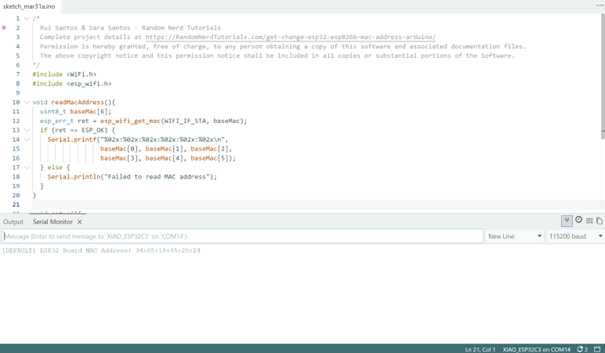
The MAC-Address can then be read from in the console:
Step 2: Flashing with Receiver Code
After recording the MAC-Address, the same ESP-32 can now be flashed with the receiver code:
´´´
/
Rui Santos & Sara Santos - Random Nerd Tutorials
Complete project details at https://RandomNerdTutorials.com/esp-now-esp32-arduino-ide/
Permission is hereby granted, free of charge, to any person obtaining a copy of this software and associated documentation files.
The above copyright notice and this permission notice shall be included in all copies or substantial portions of the Software.
/
include
include
// Structure example to receive data // Must match the sender structure typedef struct struct_message { char a[32]; int b; float c; bool d; } struct_message;
// Create a struct_message called myData struct_message myData;
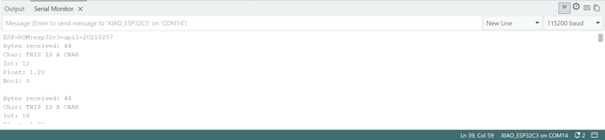
// callback function that will be executed when data is received void OnDataRecv(const uint8_t * mac, const uint8_t *incomingData, int len) { memcpy(&myData, incomingData, sizeof(myData)); Serial.print("Bytes received: "); Serial.println(len); Serial.print("Char: "); Serial.println(myData.a); Serial.print("Int: "); Serial.println(myData.b); Serial.print("Float: "); Serial.println(myData.c); Serial.print("Bool: "); Serial.println(myData.d); Serial.println(); }
void setup() { // Initialize Serial Monitor Serial.begin(115200);
// Set device as a Wi-Fi Station WiFi.mode(WIFI_STA);
// Init ESP-NOW if (esp_now_init() != ESP_OK) { Serial.println("Error initializing ESP-NOW"); return; }
// Once ESPNow is successfully Init, we will register for recv CB to // get recv packer info esp_now_register_recv_cb(esp_now_recv_cb_t(OnDataRecv)); }
void loop() {
} ´´´
Step 3: Flashing with Sender Code
The other ESP32 is then flashed with the sender code. Before doing so, the code is edited to contain the MAC-address of the receiver. The default MAC-address in the code (0xFF, 0xFF, 0xFF, 0xFF, 0xFF, 0xFF) is a broadcast address for all devices in a network. Essentially all ESP32 devices nearby that are flashed with a receiver code are able to receive the message from a sender broadcasting to this address (information from DeepSeek, confirmed by testing).
´´´ / Rui Santos & Sara Santos - Random Nerd Tutorials Complete project details at https://RandomNerdTutorials.com/esp-now-esp32-arduino-ide/ Permission is hereby granted, free of charge, to any person obtaining a copy of this software and associated documentation files. The above copyright notice and this permission notice shall be included in all copies or substantial portions of the Software. /
include
include
// REPLACE WITH YOUR RECEIVER MAC Address uint8_t broadcastAddress[] = {0xFF, 0xFF, 0xFF, 0xFF, 0xFF, 0xFF};
// Structure example to send data // Must match the receiver structure typedef struct struct_message { char a[32]; int b; float c; bool d; } struct_message;
// Create a struct_message called myData struct_message myData;
esp_now_peer_info_t peerInfo;
// callback when data is sent void OnDataSent(const uint8_t *mac_addr, esp_now_send_status_t status) { Serial.print("\r\nLast Packet Send Status:\t"); Serial.println(status == ESP_NOW_SEND_SUCCESS ? "Delivery Success" : "Delivery Fail"); }
void setup() { // Init Serial Monitor Serial.begin(115200);
// Set device as a Wi-Fi Station WiFi.mode(WIFI_STA);
// Init ESP-NOW if (esp_now_init() != ESP_OK) { Serial.println("Error initializing ESP-NOW"); return; }
// Once ESPNow is successfully Init, we will register for Send CB to // get the status of Trasnmitted packet esp_now_register_send_cb(esp_now_send_cb_t(OnDataSent));
// Register peer
memcpy(peerInfo.peer_addr, broadcastAddress, 6);
peerInfo.channel = 0;
peerInfo.encrypt = false;
// Add peer
if (esp_now_add_peer(&peerInfo) != ESP_OK){
Serial.println("Failed to add peer");
return;
}
}
void loop() { // Set values to send strcpy(myData.a, "THIS IS A CHAR"); myData.b = random(1,20); myData.c = 1.2; myData.d = false;
// Send message via ESP-NOW esp_err_t result = esp_now_send(broadcastAddress, (uint8_t *) &myData, sizeof(myData));
if (result == ESP_OK) { Serial.println("Sent with success"); } else { Serial.println("Error sending the data"); } delay(2000); } ´´´ The broadcast of the default message was received.